
One-click form autofill
Fill names, ages, gender, berth preferences and mobile number in under 5 seconds.
Less typing, more time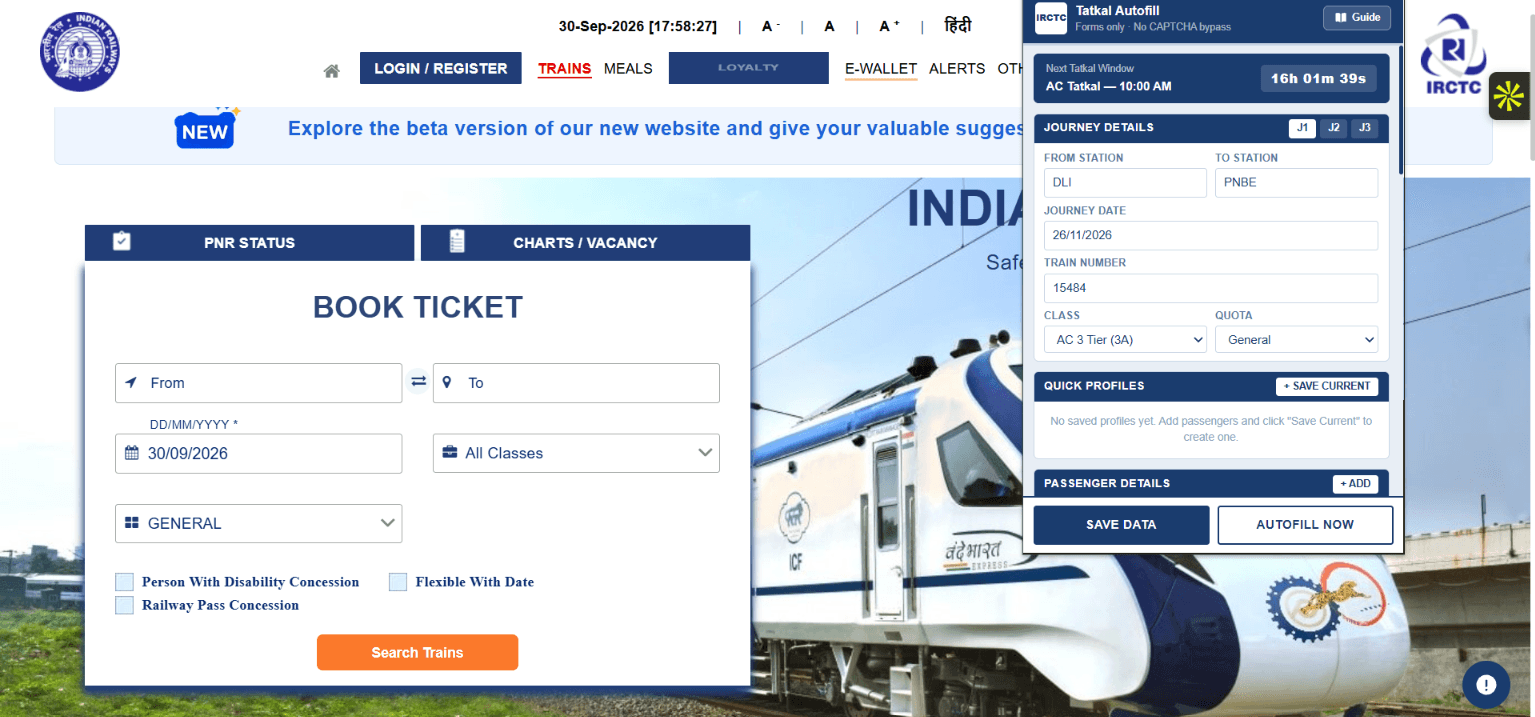
While others type passenger details one by one, your IRCTC form is already filled. IRCTC Tatkal Autofill Assistant is a Chrome extension that completes supported booking fields in under 5 seconds.
4.4/5 from 26 reviews· 4,000+ users · For desktop Chrome · You solve the CAPTCHA
Plans & pricing
Autofill unlocks with any plan. Try it with Basic for ₹9 (1 day), or go Pro for group bookings and the speed extras.
₹9/ 1 day
Try it on your next solo Tatkal booking. One-time payment.
₹149/ month
30 days of Pro. One-time payment, no auto-renewal.
₹999/ year
Just ₹83/month. 365 days of Pro, one-time payment.
Prices in Indian Rupees. One-time payment via Razorpay (UPI, cards, net banking). Plans don't auto-renew; buying again adds the time to your current plan.
Ranked #1 in its category
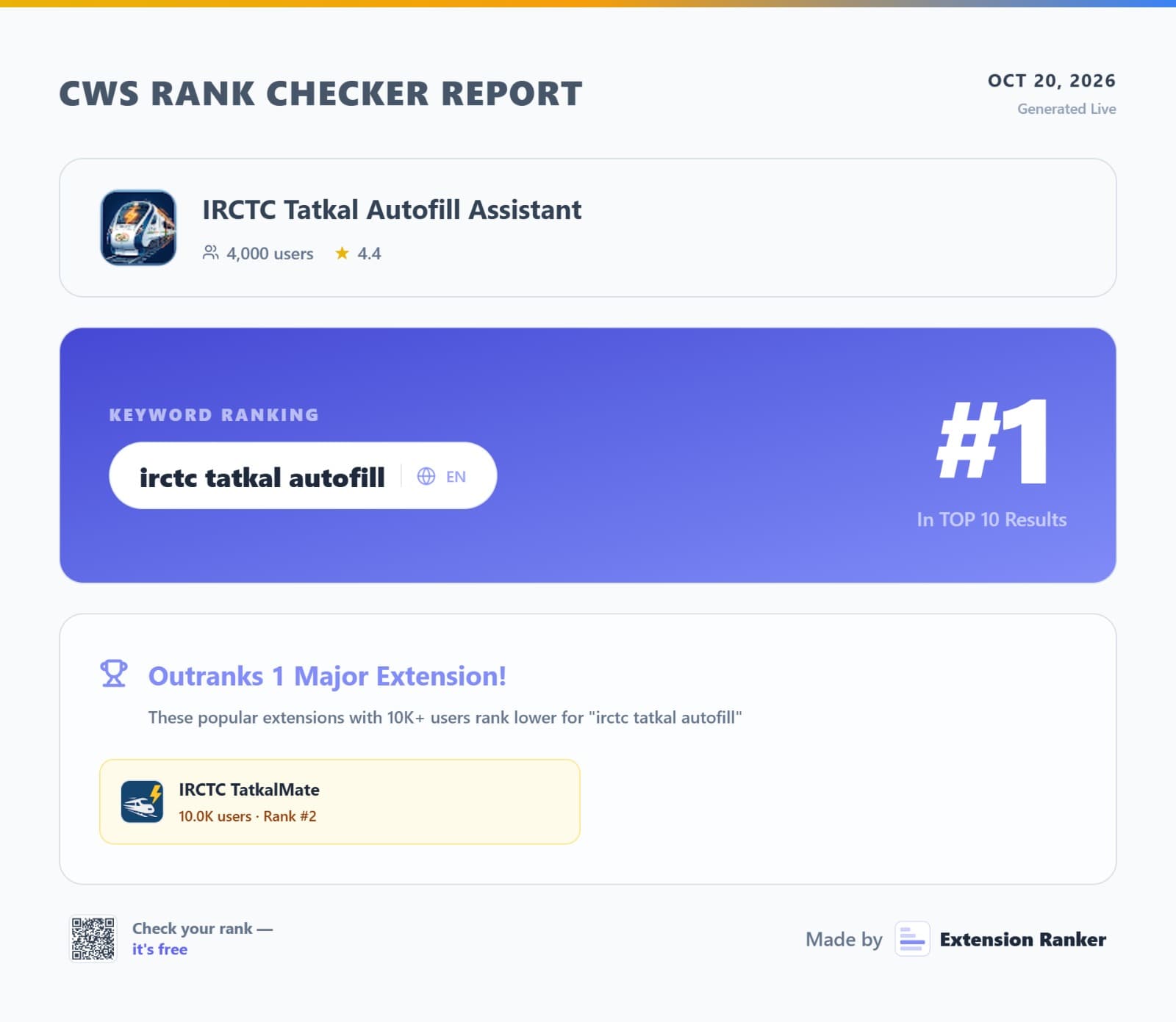
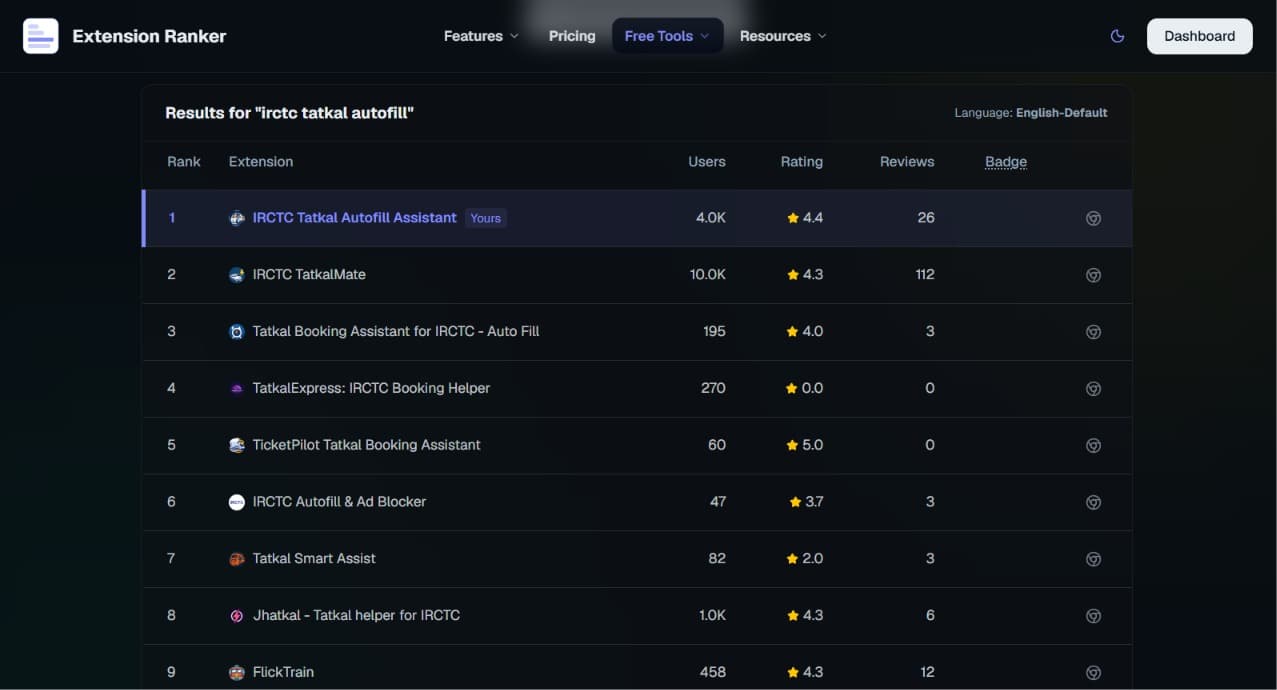
IRCTC Tatkal Autofill Assistant ranks #1 on the Chrome Web Store for “irctc tatkal autofill”, ahead of extensions with more than twice as many users. It is used by 4,000+ travelers and rated 4.4 out of 5 from 26 reviews.
First in Chrome Web Store search for “irctc tatkal autofill”, ahead of extensions with more than twice the users.
Rated 4.4 out of 5 across 26 reviews, the highest-rated of the top Tatkal autofill extensions with more than 1,000 users.
Fills passengers, berth, coach, boarding station, GST, insurance and payment preferences in under 5 seconds.
No CAPTCHA bypass, no queue tricks. Your details stay in Chrome on your device and you stay in control.
Source: Extension Ranker, Chrome Web Store keyword ranking checked on . Rankings can change over time.
The 10 AM scramble
The booking window opens and every second feels important. Names, ages, berth choices, contact details, insurance, payment — there is a lot to get right before you can complete a booking.
Re-enter the same details, navigate dropdowns and race to the payment page.
One field at a time
Save your details once. Autofill the supported fields, then review and continue.
Ready in under 5 seconds
The real extension
Actual screenshots of IRCTC Tatkal Autofill Assistant on the IRCTC website.
Everything in one extension
From passenger names to your preferred payment option. No subscription, no extra steps.
Fill names, ages, gender, berth preferences and mobile number in under 5 seconds.
Less typing, more timeKeep separate groups for family, friends and work. Select the right profile before you book.
Pro · Up to 6 passengersChoose UPI or cards in advance (IRCTC E-Wallet on Pro), then review the selected option at checkout.
Ready for checkoutFill saved IRCTC login details on your own device. CAPTCHA remains yours to solve.
One less formSet your travel insurance choice ahead of time instead of hunting for it in a hurry.
Your choice, savedSet a boarding station different from your origin and let the extension select it.
Pro · Fewer dropdownsSave a coach preference such as D1, S5 or B3 to fill it when available.
Made personalSave your GST number, company name and address for business travel bookings.
For work tripsEnable automatic filling when supported IRCTC pages load, or keep one-click control.
Pro · Choose your flowMove ahead on supported review pages when no CAPTCHA needs your attention.
Keep movingYour saved information stays in Chrome's local storage, with optional encryption in settings.
On your deviceSimple from the start
Install IRCTC Tatkal Autofill Assistant from the Chrome Web Store and pick a plan.
Add passengers and booking preferences to a profile in the extension.
Choose your profile, fill the form, review it and solve any CAPTCHA yourself.
Full tutorial
Watch the video, then follow the written guide. Setup takes about 10 minutes and you only do it once.
Full video tutorial: install IRCTC Tatkal Autofill Assistant, save passenger and payment details, and autofill the IRCTC Tatkal booking form in one click.
Watch on YouTube More videos on our channelOpen the IRCTC Tatkal Autofill Assistant listing on desktop Chrome (Windows, macOS or Linux) and click Add to Chrome. Pin it from the puzzle-piece menu so the icon is always one click away.
Chrome on Android doesn't run extensions, so use a laptop or desktop.
Create an account on this site and pick a plan: Basic is ₹9 for one day and one passenger, Pro adds multiple passengers, profiles and more. Your plan activates in the extension automatically after payment.
Open the extension popup and fill in Journey Details: from and to station codes (such as DLI and PNBE), journey date, train number, class (such as AC 3 Tier) and quota (Tatkal). Pro lets you save up to three journeys (J1–J3).
Add each passenger's name, age, gender, berth preference and nationality, plus your mobile number. Then choose a payment method: BHIM/UPI, card, net banking or IRCTC E-Wallet (Pro). Click Save Data. On Pro, use Save Current to keep groups as named profiles for family, friends or work.
IRCTC allows at most four passengers on one Tatkal ticket.
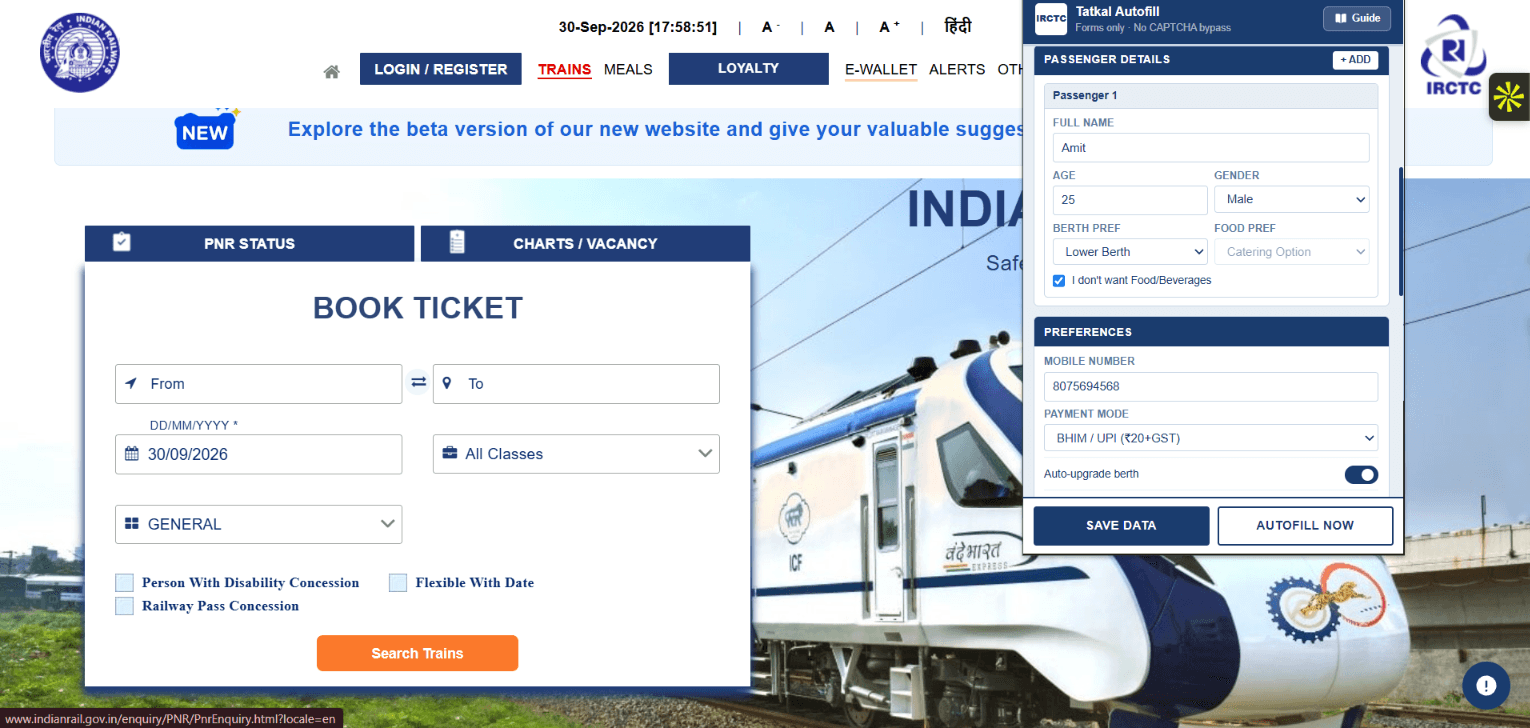
Save your IRCTC login, travel insurance choice, preferred coach, boarding station, food preference and GST details. Turn on autofill on page load (Pro) if you want forms filled the moment IRCTC pages open.
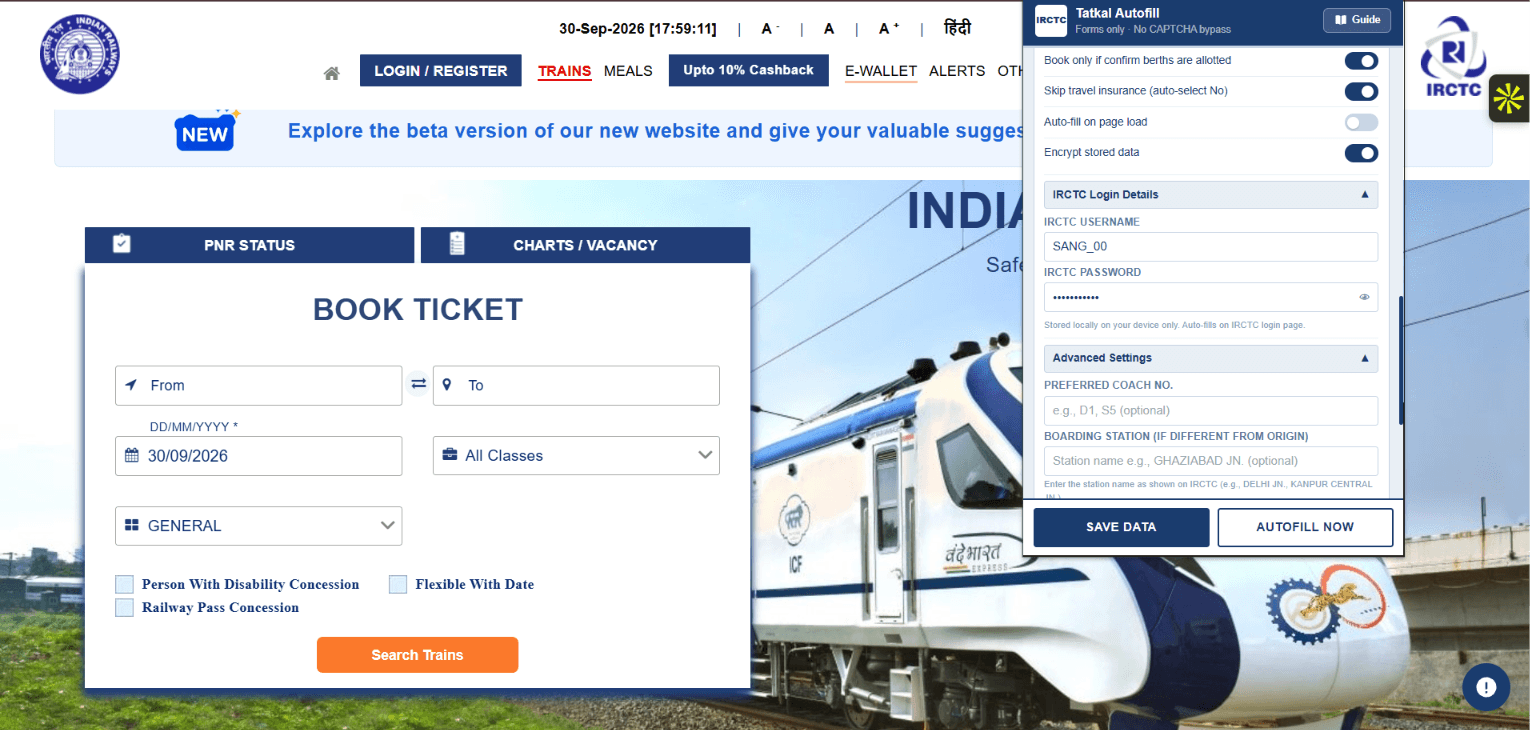
Before 10:00 AM (AC classes) or 11:00 AM (non-AC classes), open the IRCTC website, let the extension fill your login and solve the CAPTCHA yourself. Watch the built-in Tatkal countdown timer.
When the Tatkal window opens, pick your train and class and click Book Now. On the passenger page, click Autofill Now in the extension (or let it fill on load) and every supported field is completed in under 5 seconds.
Check the passenger details, berth choices and fare, solve any CAPTCHA, then complete payment with your saved option. Your ticket is confirmed by IRCTC once payment goes through.
Autofill saves typing time; availability and confirmation still depend on IRCTC.
A clearer way to book
The extension takes care of repetitive form fields so you can spend your attention on checking the booking, CAPTCHA and payment.
| Booking task | By hand | With extension |
|---|---|---|
| Passenger details | Type each field | Fill saved profile |
| Payment choice | Select while booking | Select saved choice |
| Boarding station | Find in dropdown | Fill saved station |
| GST details | Type each field | Fill saved details |
| CAPTCHA | Solve yourself | Solve yourself |
Made for your journey
Keep family details ready before the holiday booking rush.
Stop entering the same information again and again.
Save GST details and preferences for your next work trip.
On Pro, fill details for several passengers from a single profile.
Confidence matters
You stay in control of your booking from the first field to the final payment.
You solve any CAPTCHA yourself. This tool helps fill forms; it doesn't bypass booking checks.
Saved details use Chrome's local storage. Optional encryption is available in extension settings.
Check passenger information, availability and payment details before completing your booking.
Good to know
Everything you need to know about Tatkal booking and IRCTC Tatkal Autofill Assistant.
Still have a question? Contact us Facing an issue? WhatsApp supportIRCTC Tatkal Autofill Assistant ranks #1 on the Chrome Web Store for “irctc tatkal autofill” (Extension Ranker, 20 October 2026), ahead of extensions with more users. It has 4,000+ users and a 4.4-star rating from 26 reviews, fills Tatkal forms in under 5 seconds and keeps your data on your device.
Install it from the Chrome Web Store, choose a plan, then save your journey, passengers and payment preference in the extension popup. On the IRCTC passenger page, click Autofill, review the details, solve the CAPTCHA and pay. The video tutorial and step-by-step guide on this page walk through every step.
Prepare before the booking window opens. Save your passenger details and preferences in the extension, then use Autofill on the IRCTC booking form. It fills supported fields in under 5 seconds, so you can focus on checking your details, completing any CAPTCHA and finishing payment. Ticket availability and confirmation still depend on IRCTC.
No. This extension fills form fields only. You must solve any CAPTCHA yourself and complete the booking on IRCTC.
Tatkal booking generally opens at 10:00 AM IST for AC classes and 11:00 AM IST for non-AC classes, one day before the train's departure from its originating station. Check IRCTC for current rules and availability.
Yes, on Pro. The Basic plan fills one passenger. Pro lets you save named profiles for family, friends or work trips, with details for up to six passengers per profile. Choose the profile you need before filling the form, and keep in mind that IRCTC allows at most four passengers on a single Tatkal ticket.
You can save a preference for BHIM/UPI, cards and net banking on any plan, or IRCTC E-Wallet on Pro. The extension selects supported options on the passenger and payment pages; you remain responsible for reviewing and completing payment.
The extension is designed for IRCTC's Next Generation booking website. Since IRCTC can change its pages, always review the filled details before submitting.
According to the extension's product information, saved passenger details and preferences are stored locally in Chrome on your device. Optional encryption is available in its settings. Check the Chrome Web Store listing for current privacy details before saving sensitive information.
No. Autofill saves typing time, but it cannot reserve a seat, bypass a queue or guarantee a confirmed ticket. Availability, connection speed and payment completion all still matter.
Yes, it can fill saved login details on the IRCTC login page. It does not solve CAPTCHA or sign in for you. Consider whether you want to store login details on a shared computer.
The extension is for desktop Google Chrome on Windows, macOS and Linux. Chrome on Android does not support desktop extensions.
No. IRCTC Tatkal Autofill Assistant is an independent tool and is not affiliated with, endorsed by or operated by IRCTC or Indian Railways.
Your next booking starts here
Join 4,000+ travelers using a faster way to fill IRCTC forms. Try it for ₹9 on desktop Chrome.